AJA ROI Review
August 19, 2013, 08:27 AM
https://www.aotg.com/aja-roi-review/
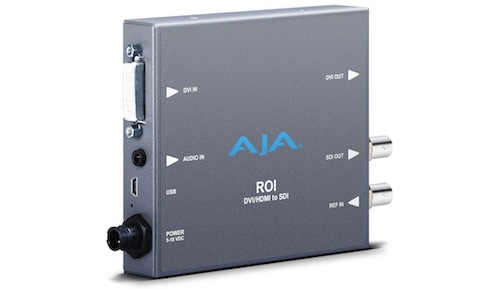 The Tech
So, what’s under the hood?
Convert DVI/HDMI inputs to HD/SD-SDI
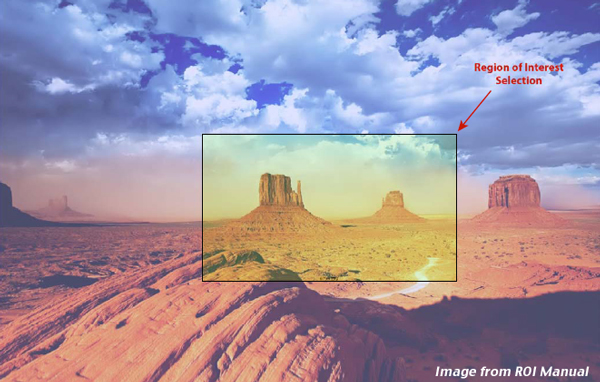
User-adjustable “region of interest†for personalized screen extraction
4:3/16:9 conversion modes supported
Setup via PC/Mac using USB port and supplied USB cable (AJA MiniConfig software application supplied on CD)
Frame-rate conversion
Automatic configuration to input video raster and frame rate
SDI output configurable to most common SD and HD formats (1080i59.84 max)
Genlock with reference input
Audio input via 3.5mm-2channel analog input or 8-channel HDMI embedded
Embedded SDI audio out (up to 8 channels)
Uses universal input +5V power supply AJA model DWP-U-R1 (included)
Video:
Output format select
Aspect Ratio convert
4:3 to 16:9: Sidebar, 14:9, Full
16:9 or 16:10 to 4:3: Letterbox, Full
16:10 to 16:9: Letterbox, Full
Region of Interest:
On/Off
Size/Position (scroll bars, buttons, or numerical entry)
Audio:
Input Select: Analog (2-channel), HDMI (8-channel)
Mute Audio out
Input Data Range Control:
1-255 (default – 8-bit nomenclature)
16-235
Analog Audio:
A single 3.5 mm analog audio connector accepts two channels of analog audio which can be embedded into the SDI output as determined by the default configuration or audio configuration selections using AJA MiniConfig.
USB Port:
Accepts USB mini connector
DVI/HDMI Output:
This is a pass-through output for use on a second computer monitor for using Screen Picker. Connections are the same as described for DVI/HDMI input above.
SDI Video Output:
Standard BNC connector for coaxial SDI monitor connection.
Reference Video Input:
The Reference BNC accepts an Output timing reference signal. The reference can be SD Blackburst or HD tri-level sync. Permissible reference video inputs include:
â—‹ 525 Color Black
â—‹ 625 Color Black
â—‹ 1080i Tri-level Sync
â—‹ 720p Tri-level Sync
(Note this list is from their hardware documentation)
The Feel
Overall, the ROI has a great interactive feel to it. The only problem I had was fixed with a simple upgrade of the MiniConfig software downloaded from http://www.aja.com/en/products/mini-converters/roi/#support.
Other than that this tool runs smoothly. Once everything's plugged in it will immediately be recognized and you can hit the ground running. If you’ve used any AJA tool you’ll immediately understand the MiniConfig interface. In this case we have five tabs: Input Region of Interest, Output, Audio, Update, and Info.
The Tech
So, what’s under the hood?
Convert DVI/HDMI inputs to HD/SD-SDI
User-adjustable “region of interest†for personalized screen extraction
4:3/16:9 conversion modes supported
Setup via PC/Mac using USB port and supplied USB cable (AJA MiniConfig software application supplied on CD)
Frame-rate conversion
Automatic configuration to input video raster and frame rate
SDI output configurable to most common SD and HD formats (1080i59.84 max)
Genlock with reference input
Audio input via 3.5mm-2channel analog input or 8-channel HDMI embedded
Embedded SDI audio out (up to 8 channels)
Uses universal input +5V power supply AJA model DWP-U-R1 (included)
Video:
Output format select
Aspect Ratio convert
4:3 to 16:9: Sidebar, 14:9, Full
16:9 or 16:10 to 4:3: Letterbox, Full
16:10 to 16:9: Letterbox, Full
Region of Interest:
On/Off
Size/Position (scroll bars, buttons, or numerical entry)
Audio:
Input Select: Analog (2-channel), HDMI (8-channel)
Mute Audio out
Input Data Range Control:
1-255 (default – 8-bit nomenclature)
16-235
Analog Audio:
A single 3.5 mm analog audio connector accepts two channels of analog audio which can be embedded into the SDI output as determined by the default configuration or audio configuration selections using AJA MiniConfig.
USB Port:
Accepts USB mini connector
DVI/HDMI Output:
This is a pass-through output for use on a second computer monitor for using Screen Picker. Connections are the same as described for DVI/HDMI input above.
SDI Video Output:
Standard BNC connector for coaxial SDI monitor connection.
Reference Video Input:
The Reference BNC accepts an Output timing reference signal. The reference can be SD Blackburst or HD tri-level sync. Permissible reference video inputs include:
â—‹ 525 Color Black
â—‹ 625 Color Black
â—‹ 1080i Tri-level Sync
â—‹ 720p Tri-level Sync
(Note this list is from their hardware documentation)
The Feel
Overall, the ROI has a great interactive feel to it. The only problem I had was fixed with a simple upgrade of the MiniConfig software downloaded from http://www.aja.com/en/products/mini-converters/roi/#support.
Other than that this tool runs smoothly. Once everything's plugged in it will immediately be recognized and you can hit the ground running. If you’ve used any AJA tool you’ll immediately understand the MiniConfig interface. In this case we have five tabs: Input Region of Interest, Output, Audio, Update, and Info.

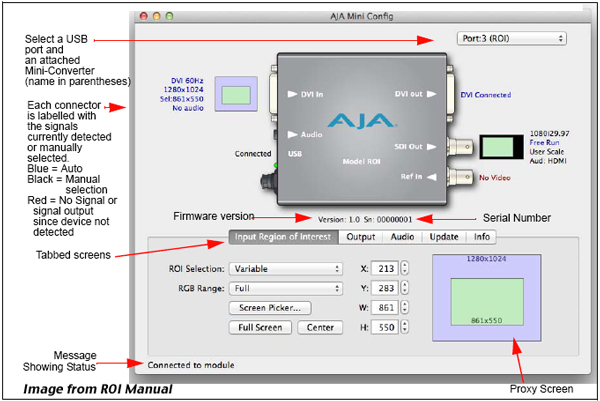 The Auto mode detects the DVI/HDMI signal at input, the variable mode allows the post specialist to alter the selection, and the fixed mode gives specific aspect ratios. You can use the X/Y coordinates under this tab to determine where the region will appear.
I can hear all the software users already, “BUT what about allowing me to just drag the section I want?†well, that option is available under the variable selection. Using the Screen Picker button you can drag a light green box to highlight the desired area.
The Auto mode detects the DVI/HDMI signal at input, the variable mode allows the post specialist to alter the selection, and the fixed mode gives specific aspect ratios. You can use the X/Y coordinates under this tab to determine where the region will appear.
I can hear all the software users already, “BUT what about allowing me to just drag the section I want?†well, that option is available under the variable selection. Using the Screen Picker button you can drag a light green box to highlight the desired area.
 Now I don’t want this to become a tutorial, since that would be better demoed in a video rather than a written blog post.
This is a great tool, it does have elements that could be enhanced, but most of these are petty and will get updated in software updates. What’s amazing is how much they got right on this product right out of the gate.
The Application
As I mentioned before, as a doc editor, I’ve had producers and directors ask me to grab protest footage from YouTube and Vimeo or a speech given at a live event from Ustream. We utilize this as a placeholder until we can get the rights locked down. AJA’s ROI raises the quality of the clips we can pull directly from the Internet, and allows end users to pull high quality images from the web for use in shows, news broadcasts and endless other areas of entertainment.
Summary
A great addition to the AJA family of breakout boxes, if you are currently using the software based screen capture tools and want to upgrade your quality this is your solution!
Now I don’t want this to become a tutorial, since that would be better demoed in a video rather than a written blog post.
This is a great tool, it does have elements that could be enhanced, but most of these are petty and will get updated in software updates. What’s amazing is how much they got right on this product right out of the gate.
The Application
As I mentioned before, as a doc editor, I’ve had producers and directors ask me to grab protest footage from YouTube and Vimeo or a speech given at a live event from Ustream. We utilize this as a placeholder until we can get the rights locked down. AJA’s ROI raises the quality of the clips we can pull directly from the Internet, and allows end users to pull high quality images from the web for use in shows, news broadcasts and endless other areas of entertainment.
Summary
A great addition to the AJA family of breakout boxes, if you are currently using the software based screen capture tools and want to upgrade your quality this is your solution!
At NAB 2013 AJA announced their ROI Mini-Converter, which they emphatically stated does not stand for “Return on Investment” but “Region of Interest”. When they announced it, I was very interested in it since as a documentary editor...

Newest from AOTG.com
-

Daniel George McDonald on Editing Cheer's Season 2 Finale
Daniel George McDonald sits down to discuss creating the finale for Cheer Season 2.
-
Editing The Black Lady Sketch Show
Gordon sits down with the editorial team of The Black Lady Sketch Show to discuss their approach to ...
-

Philip White on Crafting A Madea Homecoming's Music
Gordon sits down with Philip to discuss his work with Tyler Perry and his latest film A Madea Homeco...
Site Links
Tools
Sister Sites
© 2007-2026 www.aotg.com Ver. 3.0 All Content created and posted by Art of the Guillotine users Art of the Guillotine graphics, logos, designs, page headers, button icons, scripts, and other service names are the trademarks of Art of the Guillotine Inc. Use of this material outside of this site is strictly prohibited.